






WRAP-AROUND CARE
Breakfast Club
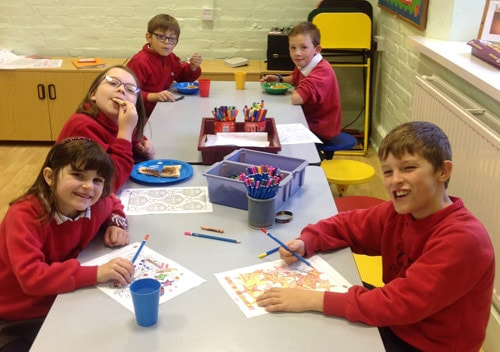
A Breakfast Club is available every day from 7.50am. Children arriving between 7.50am and 8.30am will be provided with breakfast. The costs for this is £3.50 per session. Pre-booking via School Gateway is necessary.
Breakfast club can be paid using the government tax-free childcare scheme.
Breakfast club can be paid using the government tax-free childcare scheme.
Tree Tops Pre-School

|
Out of school care is provided by Treetops After School Club and Treetops Holiday Club, in the neighbouring village of Bridestowe. Children can be collected from Lydford School by arrangement with Treetops After School Club.
Please also see our after school clubs page.
E-SAFETY
Being online is an integral part of children and young people’s lives and of their education. The internet and online technology provides new opportunities for learning and growth, but it can also expose them to new types of risks.
E-safety forms a fundamental part of Lydford’s safeguarding and child protection measures. Keeping children safe online is one of the biggest challenges facing society today and it is all of our responsibility to ensure that children are educated to make positive, informed choices when they are online. Online safety is a core aspect of our school curriculum. Your help at home is also needed to prevent children accessing inappropriate material at home by way of filters and parental controls.
In school, all new pupils are asked to sign an acceptable ICT working agreement where children take responsibility for their online actions.
The Dartmoor Multi-Academy Trust have a comprehensive ICT policy which addresses technical firewalls and other professional measures to keep children safe, but at Highampton School we also feel it is important that the children themselves learn to keep themselves safe online.
The School Acceptable ICT Working Agreement is below:
E-safety forms a fundamental part of Lydford’s safeguarding and child protection measures. Keeping children safe online is one of the biggest challenges facing society today and it is all of our responsibility to ensure that children are educated to make positive, informed choices when they are online. Online safety is a core aspect of our school curriculum. Your help at home is also needed to prevent children accessing inappropriate material at home by way of filters and parental controls.
In school, all new pupils are asked to sign an acceptable ICT working agreement where children take responsibility for their online actions.
The Dartmoor Multi-Academy Trust have a comprehensive ICT policy which addresses technical firewalls and other professional measures to keep children safe, but at Highampton School we also feel it is important that the children themselves learn to keep themselves safe online.
The School Acceptable ICT Working Agreement is below:
Help for Parents
Please note that no search engine is ever 100% safe but below provides some links to some “safer” search engines:
Research searching
Image searching
Research searching
Image searching
Websites for More Information
CEOP (The Child Exploitation and Online Protection Centre) delivers a multi-agency service dedicated to tackling the abuse and exploitation of children in the real and ‘e’ world. Often it is referred to as an online 999. By clicking on the button, young people and parents can get advice on a range of issues such as viruses, hacking and dealing with bullying online.
Vodafone have produced a Digital Parenting Magazine which informs parents about the various technologies children are accessing today. There is information on Facebook settings, Xbox360 settings, Blackberry controls, jargon busting and many more 'How to Guides'. Well worth a read!
Vodafone have produced a Digital Parenting Magazine which informs parents about the various technologies children are accessing today. There is information on Facebook settings, Xbox360 settings, Blackberry controls, jargon busting and many more 'How to Guides'. Well worth a read!

The “Thinkuknow” website is brought to you by the Child Exploitation and Online Protection (CEOP) centre.

|
Here you will find information and resources to help you support your child to have a happy and safe online experience.
SCHOOL GATEWAY
Communications and Payment Gateway

|
SchoolGateway is a secure, online payments system for all payments for all school meals and payments and consents for trips and events. It is also our text messaging system for urgent text messages e.g. if clubs or fixtures are cancelled, and our email application for notification of payment/consent requests.
To register, simply sign up for a School Gateway account by visiting www.schoolgateway.com. Enter your current email address and mobile number (these must match the primary contact details you have registered with the school) and select the “Send PIN” button. A PIN will be sent to your mobile phone. Use this to log into your new School Gateway account. With your SchoolGateway account, you will be able to view payments, made, see when your child has had a school meal, and check your balance.
Please download the SchoolGateway app (ios and Android) – it saves the school money when we contact you.
To register, simply sign up for a School Gateway account by visiting www.schoolgateway.com. Enter your current email address and mobile number (these must match the primary contact details you have registered with the school) and select the “Send PIN” button. A PIN will be sent to your mobile phone. Use this to log into your new School Gateway account. With your SchoolGateway account, you will be able to view payments, made, see when your child has had a school meal, and check your balance.
Please download the SchoolGateway app (ios and Android) – it saves the school money when we contact you.
Frequently Asked Questions
How will emails get to me and what will they look like?
The emails will arrive in your inbox at your email address just like any other email and will have the school’s name in the “from” box.
Will I get any advertising spam?
No, your contact details are not shared with anyone except the school office. You will only receive messages from School Gateway that have been sent by Bridestowe Primary School.
What if I change my email address or mobile phone number? Please contact the school directly and inform them of any changes to your contact details - or better still, use the SIMS Parent Lite App to update your details.
Can I reply to emails or texts?
No, you should contact the school office.
The emails will arrive in your inbox at your email address just like any other email and will have the school’s name in the “from” box.
Will I get any advertising spam?
No, your contact details are not shared with anyone except the school office. You will only receive messages from School Gateway that have been sent by Bridestowe Primary School.
What if I change my email address or mobile phone number? Please contact the school directly and inform them of any changes to your contact details - or better still, use the SIMS Parent Lite App to update your details.
Can I reply to emails or texts?
No, you should contact the school office.
Class Dojo
Home Learning in the event of non-attendance (Covid19)
All children are expected to attend school, but if they are required to stay at home due to Covid19 restrictions the school will provide Home Learning. This can be accessed via Class Dojo or here on our school website.
Thank you for your support.
All children are expected to attend school, but if they are required to stay at home due to Covid19 restrictions the school will provide Home Learning. This can be accessed via Class Dojo or here on our school website.
- Home learning should be completed daily during term time.
- Work will be set by the class teacher if your child is in isolation.
- Please post completed learning in your child's portfolio on Class Dojo daily for the class teacher to see.
Thank you for your support.

Class Dojo usage
Class Dojo is an online learning platform where we have set up your classroom community ready for remote learning. It is an excellent way to stay in touch with staff and to see pupil learning. Classes can be shared with other teachers in the school and school leaders so that learning can be shared.
Class Story
Class Story is where we will share photos, tutorials and files to aide learning with ALL families. This private feed is viewable by the parents and students, through both parent and student account. Your class teacher will post weekly planning as well as tutorials, worksheets etc to assist remote learning.
Teachers may use Class Story to:
Comments under posts in stories are visible to all, so these should be appropriately positive and polite in tone. Queries or requests for support with any problems should be addressed to the teacher using the messaging service or through emailing or telephoning the school office. The school reserves the right to remove inappropriate comments from posts if necessary.
Please ensure that any photos you upload are appropriate and that your child and family members are fully dressed.
As always, if you have any safeguarding concerns, please contact the Head of School or any safeguarding lead directly and do not raise these through Class Dojo.
Portfolios
Portfolios is a digital portfolio that allows students to share with their teachers and family! Students can add to their portfolio using Chromebooks, laptops, and iOS/Android devices, even from home. Teachers can view and approve student work on Portfolios using any device. Once approved, only parent accounts connected to their student can see those particular posts and both parents and teachers can leave positive feedback in the form of a like and/or comments.
Messaging
Messaging allows you to communicate with every family in your classroom. Available on the internet and iOS/Android devices, it allows you to send messages, photos, stickers, and voice notes to parents (without giving out your phone number). Messaging is also a way to connect directly with your child’s teacher or the Head of School. Messages should be directly related to teaching and learning.
Class Dojo's Privacy Policy can be viewed here
Class Dojo is an online learning platform where we have set up your classroom community ready for remote learning. It is an excellent way to stay in touch with staff and to see pupil learning. Classes can be shared with other teachers in the school and school leaders so that learning can be shared.
Class Story
Class Story is where we will share photos, tutorials and files to aide learning with ALL families. This private feed is viewable by the parents and students, through both parent and student account. Your class teacher will post weekly planning as well as tutorials, worksheets etc to assist remote learning.
Teachers may use Class Story to:
- Record up to 8-minutes tutorial lessons
- Post challenges and learning updates
- Share links to learning sites to keep pupils practicing their skills
- Upload attachments like worksheets and other printables for families to complete at home
- Read stories to the class
- Share photos of the wider curriculum or similar to engage learners
Comments under posts in stories are visible to all, so these should be appropriately positive and polite in tone. Queries or requests for support with any problems should be addressed to the teacher using the messaging service or through emailing or telephoning the school office. The school reserves the right to remove inappropriate comments from posts if necessary.
Please ensure that any photos you upload are appropriate and that your child and family members are fully dressed.
As always, if you have any safeguarding concerns, please contact the Head of School or any safeguarding lead directly and do not raise these through Class Dojo.
Portfolios
Portfolios is a digital portfolio that allows students to share with their teachers and family! Students can add to their portfolio using Chromebooks, laptops, and iOS/Android devices, even from home. Teachers can view and approve student work on Portfolios using any device. Once approved, only parent accounts connected to their student can see those particular posts and both parents and teachers can leave positive feedback in the form of a like and/or comments.
Messaging
Messaging allows you to communicate with every family in your classroom. Available on the internet and iOS/Android devices, it allows you to send messages, photos, stickers, and voice notes to parents (without giving out your phone number). Messaging is also a way to connect directly with your child’s teacher or the Head of School. Messages should be directly related to teaching and learning.
Class Dojo's Privacy Policy can be viewed here
Section divider type: wavesOpacity --
position: bottom